
The version information of an executable file is a special resource section containing details like the file’s version number, intended operating system, original filename, and copyright information. This data is embedded into the compiled EXE. When included, users can view this information by right-clicking the program icon, selecting “Properties”, and navigating to the “Details” tab (or by pressing Alt+Enter on the file in Explorer).
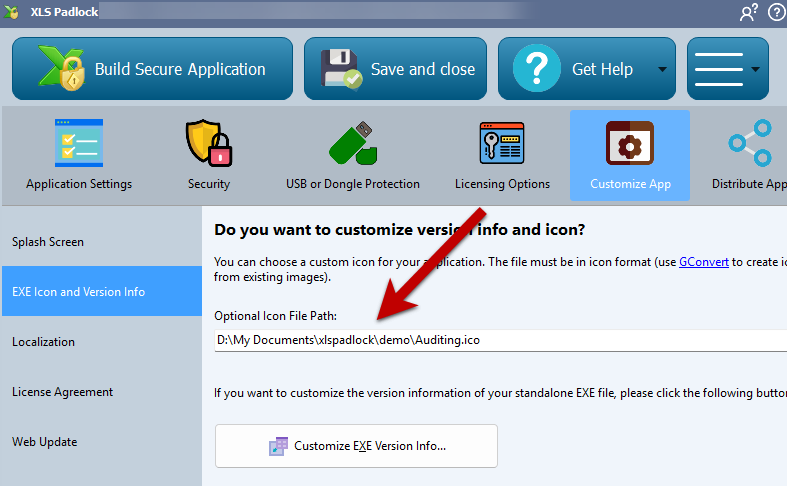
XLS Padlock allows you to embed your own version information into the standalone EXE file. Click “Customize EXE Version Info” to open a window with the following fields:
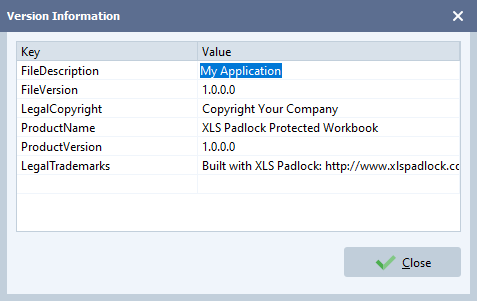
- File Description: A brief description of your application’s contents.
- Company Name: The name of your company.
- File Version: The release number of your
.exefile, in the formatX.X.X.X(e.g.,1.20.34.45). This value is also used by the Web Update feature to check for new application versions. - Legal Copyright: Your copyright notice, such as “Copyright © 2025 Your Company. All rights reserved.”
- Product Name: The name of your product or application, which is generally the same as your application title.
- Product Version: The release number of your product. It often matches the File Version.
- Legal Trademarks: Any legal trademarks you wish to include.
Info
The File Version is used by the Web Update feature.


