Activation keys on demand
Issue a unique activation code for each customer, tied to the exact workbook you compiled.
Licensing
XLS Padlock includes a key generator that issues activation codes for the workbooks you compile and distribute. Each key carries your own rules: an expiration date or a number of days, a maximum run count, and optional hardware locking. This is licensing for the applications you build, not a tool for unlocking software you did not create.
You keep the keys, the PHP validation server, and the customer relationship.
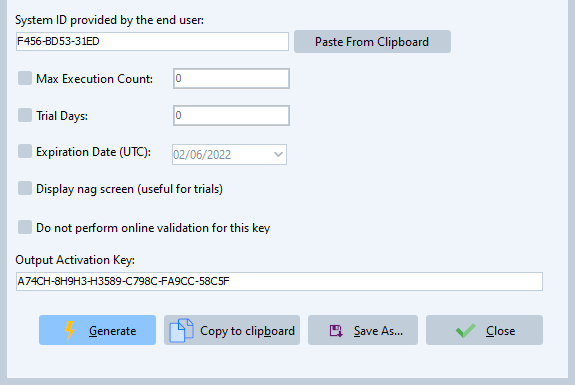
Issue a unique activation code for each customer, tied to the exact workbook you compiled.
Set an expiration date, a number of days, or a maximum number of runs per key. An optional reminder screen shows the user what is left.
Bind a key to the customer machine System ID so the license only runs where it was activated.
Validate keys entirely offline, or online against your own server to revoke and track them.
Create keys inside XLS Padlock, or with the stand-alone key generator, which runs without Excel and saves your settings as profiles.
Issue keys from your own website or store with the free PHP SDK.
In the key generator, choose what each key allows: an expiration date or a number of days, a maximum run count, and whether it is hardware locked.
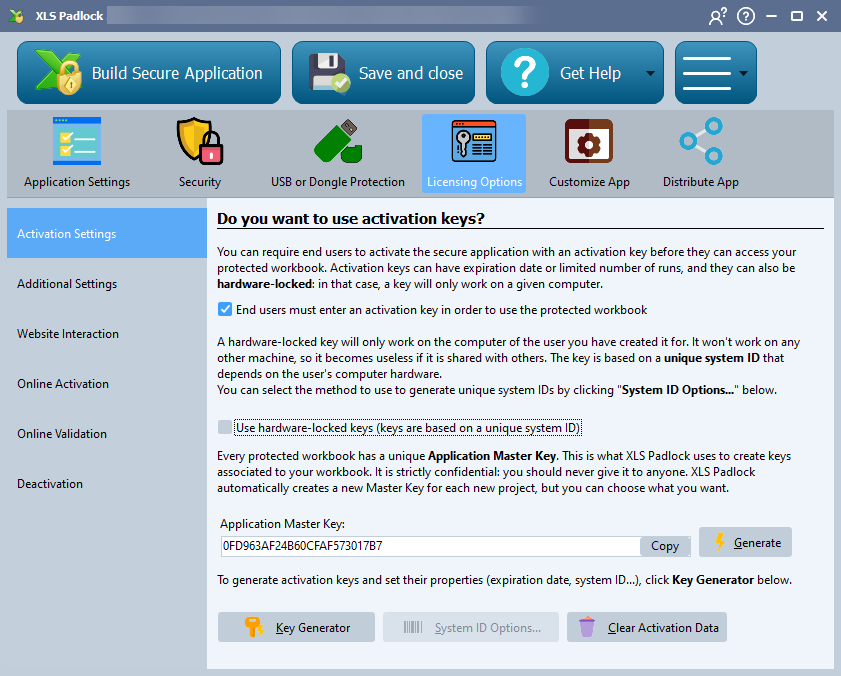
Create the activation key with the built-in key generator, the stand-alone key generator, or the PHP SDK.
The customer enters the key in your compiled workbook, which validates it offline or against your server.
Track, deactivate, or block a key later through online validation.
From issuing keys by hand to fully automated delivery, pick what matches how you sell.
Compile your workbook with XLS Padlock, define your licensing rules, then create a key with the built-in key generator, the stand-alone key generator, or the PHP SDK. Your customer enters the key to activate the compiled application.
No. XLS Padlock generates license keys for the applications you build and sell yourself. It does not unlock or crack software created by anyone else.
Yes. Each key can carry an expiration date, a number of days, or a maximum run count. To limit how many computers a customer can use, combine hardware-locked keys with online activation.
Offline validation checks the key on the customer machine with no network needed. Online validation checks it against your server, which lets you revoke a key or bind it to one machine.
Yes. The PHP Key Generator SDK and the online activation kits let your website or store issue a key the moment an order is placed.
Set up the key generator, then combine it with hardware locking and online activation.
One license, every feature included. Lifetime ownership, no subscription.