By G.D.G. Software
XLS Padlock 2026.0 is available today. It is a major release that modernizes the core of the product and tightens what a protected workbook lets out to the cloud. Three long-standing third-party components have been replaced with in-house engines we maintain ourselves, the encryption used for save files and protected archives has been reworked, and a new page gives you direct control over the Microsoft 365 cloud and AI features that can read your data.
Here is what changed and why it matters.
Keep your data out of the cloud and away from AI
Recent Excel builds ship with several cloud and AI features that can read an open workbook and send its content to external servers. Web add-ins (including the Claude for Excel plugin from Anthropic and other third-party JS add-ins), Office Scripts and Power Automate, and Microsoft connected experiences such as Copilot, Python in Excel, Smart Lookup, and Translator all fall into this category.
XLS Padlock 2026 blocks every one of these surfaces in your protected application by default, and hides their entry points in the ribbon (the Add-ins flyout, the Automate tab, and the Copilot button) so your end users are never prompted to use a feature you have turned off.
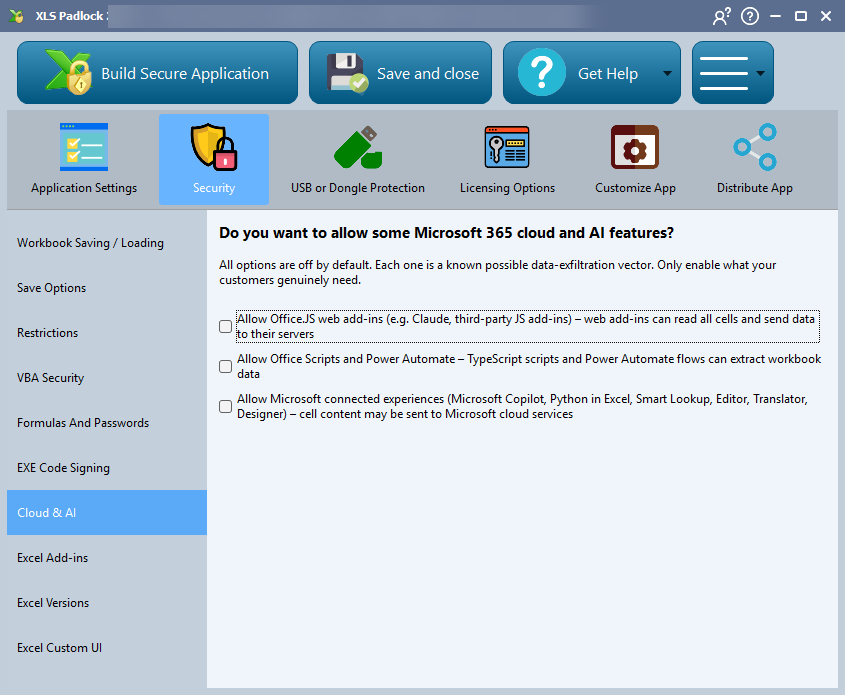
You stay in control. A new Cloud & AI page under the Security tab lets you re-enable, one by one, only what your customers genuinely need. Everything starts from the safest position: off.
Python in Excel (=PY()) is one concrete example: it runs in the Microsoft cloud, so it is turned off in your protected workbook by default and stays off unless you tick Allow Microsoft connected experiences. The same toggle governs Copilot, Smart Lookup, and Translator. You can read the details on the Cloud & AI options page in the documentation.
Modernized engines under the hood
Two of the components at the heart of XLS Padlock have been rebuilt:
- New multilingual engine. XLS Padlock and your protected applications now use the industry-standard GNU gettext format (.po and .mo) for all 10 supported languages: English, French, Spanish, Portuguese, Dutch, German, Arabic (with correct right-to-left mirroring), Italian, Simplified Chinese, and Traditional Chinese. You can also ship a single .po file to translate a protected application’s interface into any language, with no external tools required for your customers; XLS Padlock compiles it natively into the application.
- New in-house VBA engine. A new VBA engine replaces the previous third-party scripter. It produces universal bytecode that runs unchanged in both 32-bit and 64-bit protected workbooks from a single compilation pass, with faster startup and a smaller runtime.
Stronger encryption and safer activation
Security work in this release goes well beyond the cloud surfaces:
- Reworked save-file encryption. XLSC and XLSCE save files now use AES-256-CTR encryption with HKDF-SHA256 key derivation and HMAC-SHA256 authentication, replacing the legacy scheme. Save files written by older versions keep opening unchanged.
- Signed online activation (optional). Your protected application can now verify the activation server’s response with an Ed25519 signature before trusting any field, including the status and error messages shown to the end user. This protects against tampering on the network path even over HTTPS, for example a corporate proxy or a security product that injects its own trusted root. A compatibility option, checked by default, preserves the previous behavior. To enable the new mode you need the 2026 version of your activation kit (Activation Kit, WooCommerce Integration Kit, or FastSpring Subscription Kit), which serves both old and new applications from the same install.
- Enhanced hardware fingerprint (optional). A reinforced System ID computation is available on the Hardware ID Options dialog. The System ID format is unchanged (XXXX-XXXX-XXXX). It is on by default for new projects and off for projects created with earlier versions, because enabling it rotates the System ID and invalidates previously issued activation keys.
A fully silent, fully branded startup
A new option on the Splash Screen page lets your application run entirely from your own VBA UserForms, with the Excel main window and its taskbar icon never appearing at any point. Excel is hidden from the very start of launch, so there is no flash and no Excel splash before your first form is shown. Combined with the splash screen and the option to hide the loading dialog, you can deliver a startup that looks entirely like your own software.
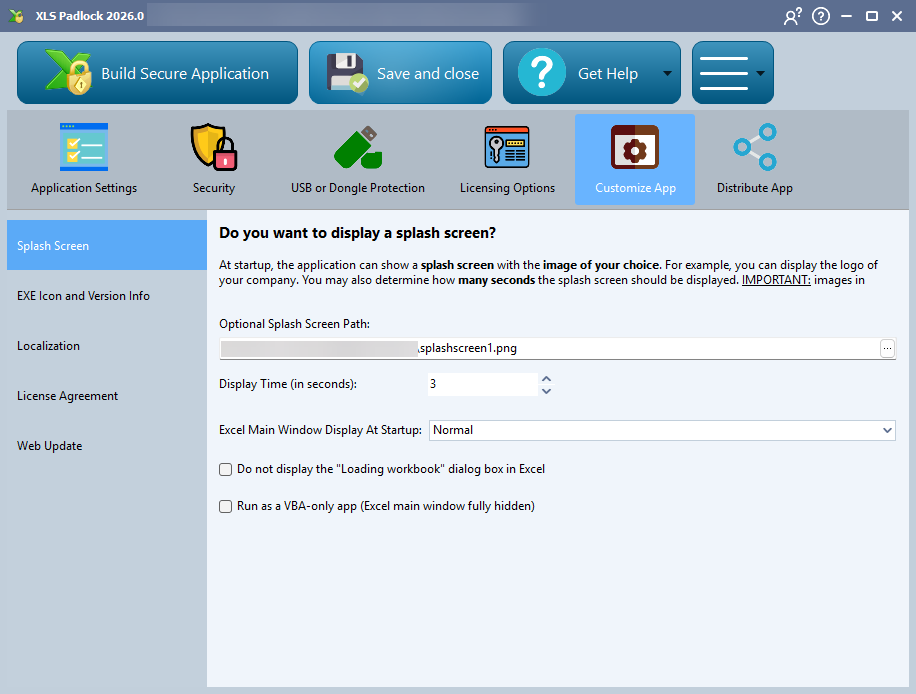
The application launcher also shows a welcome dialog at startup now, and clearly rejects bundles produced by versions older than 2026 instead of failing with a cryptic error.
Hardened application startup
The startup loader inside every protected application has been hardened against local tampering, DLL search-order hijacking, and symbolic-link or junction redirection. It now verifies that its runtime components are signed by G.D.G. Software before loading them, and Release builds enable modern exploit mitigations (Control Flow Guard and CET shadow stack). Startup was also fixed on corporate or domain-joined profiles whose AppData path exceeds the historical 260-character limit.
More improvements and fixes
This version includes a long list of refinements, among them:
- Python in Excel workbooks. Packing a workbook that contains Python in Excel cells used to silently drop the Python content. XLS Padlock now detects this at the start of compilation and offers to enable the option that preserves it.
- Locale-aware cell value restoration. Values restored from a XLSCE save file are now interpreted using Excel’s interface language rather than the Windows regional settings, fixing cases where numbers could be restored as text.
- Reliable save operations. Excel “Replace” and “Move” save operations now round-trip content correctly, and formulas that depend on restored cell values recalculate automatically on opening.
- Azure Artifact Signing detection and deactivation or relaunch from VBA under 64-bit Excel have both been fixed.
A few things were removed in the move to the new engines. Most importantly, protected applications and .xplapp bundles produced by XLS Padlock 2026.0 require a 2026.0 or newer runtime: re-pack any workbook you want to distribute with this release. VBA scripts that relied on named constants from the previous scripter (such as xlAll or xlAutomatic) must now use their literal numeric values or the late-bound Application object, and the legacy .sil translation format is no longer used at runtime. The full list is in the changelog.
Get XLS Padlock 2026
👉 Existing users: download XLS Padlock 2026.0 for free if your maintenance is still active. If not, you can renew it at a discount.
👉 New users: download the free trial to protect a workbook end to end, or buy XLS Padlock when you are ready.
As always, tell us what you think and what you would like to see next through our feedback forum or our contact form.