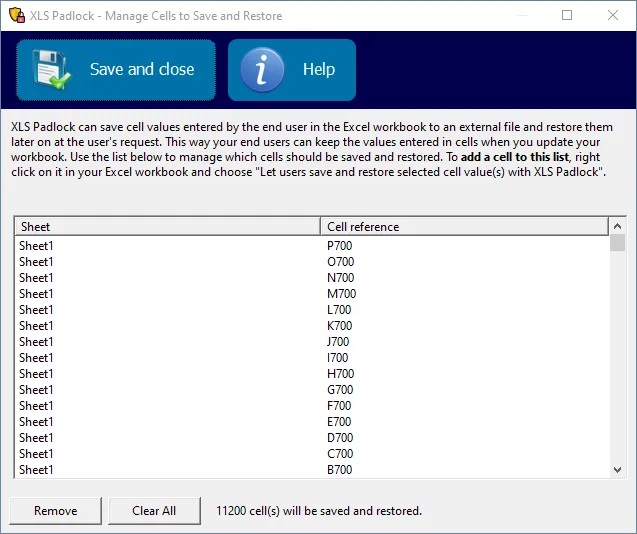
Comment définir les cellules à sauvegarder et restaurer
Lorsque vous utilisez le mode Save defined cell values only, vous devez spécifier quelles cellules votre application va sauvegarder et restaurer.
👉 Pour ce faire, il vous suffit de cliquer avec le bouton droit sur une ou plusieurs cellules et de choisir « Let users save and restore selected cell value(s) with XLS Padlock » dans le menu contextuel.
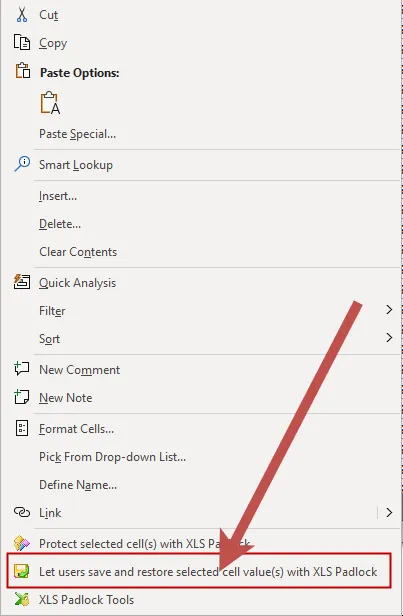
XLS Padlock confirmera que les cellules sélectionnées sont marquées pour la sauvegarde et la restauration.
Aperçu des cellules à sauvegarder
Section titled “Aperçu des cellules à sauvegarder”Pour afficher toutes les cellules configurées pour la sauvegarde, cliquez sur « Cell Save And Restore » dans l’onglet du ruban XLS Padlock :

Cela ouvre une fenêtre répertoriant toutes les cellules configurées. À partir de là, vous pouvez supprimer des cellules individuelles ou effacer la liste entière. Passez cette liste en revue chaque fois que vous modifiez la disposition du classeur, afin que les cellules marquées pointent toujours vers les adresses prévues.