
XLS Padlock features an integrated VBA compiler that transforms your Basic scripts into secure bytecode, making them inaccessible to end-users. Compiling parts of your VBA macros removes the original source code, making it impossible to copy.
Video Tutorial
For a tutorial on compiling a VBA function, you can watch this video.
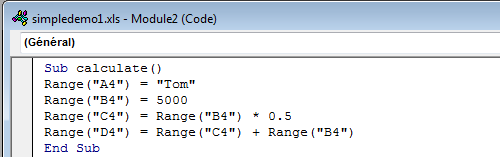
For instance, consider this original code:
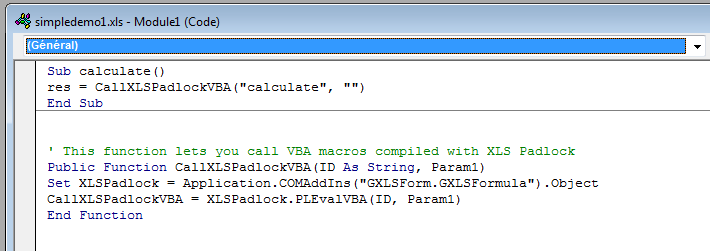
Once protected, the original calculate() sub is replaced by a call to an internal XLS Padlock function that executes the compiled bytecode:
The original code is moved into the XLS Padlock VBA Editor and compiled from there:
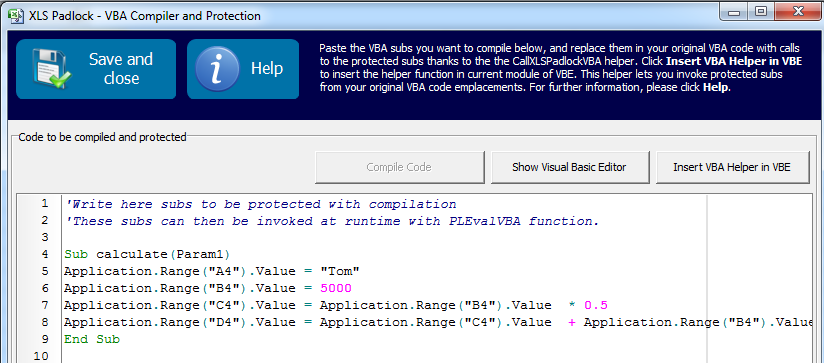
Note that some modifications may be necessary, as the compiler requires explicit use of the Application object to access Excel objects.
The compiler is not a simple obfuscator; it completely transforms your VBA code into binary and stores it securely within the application. When combined with password-protecting your VBA project, this renders password-cracking tools useless, as they cannot access the original XLS file.
Compiler Limitations
- You may need to modify your original VBA code for it to compile, as the XLS Padlock VBA compiler is not as advanced as Microsoft’s VB interpreter.
- Entire macros generally cannot be compiled, only portions of them.
- Some objects and default properties are not accessible.
👉 See Also: Learn how to write and compile secure VBA code


