Writing and Compiling Secure VBA Code
You can protect sensitive parts of your VBA code by compiling them into bytecode with XLS Padlock. We recommend combining compiled bytecode with your existing VBA code for a balanced approach to security and development.
-
In Excel, click “VBA Compiler and Protection” to open the XLS Padlock VBA Editor and Compiler:

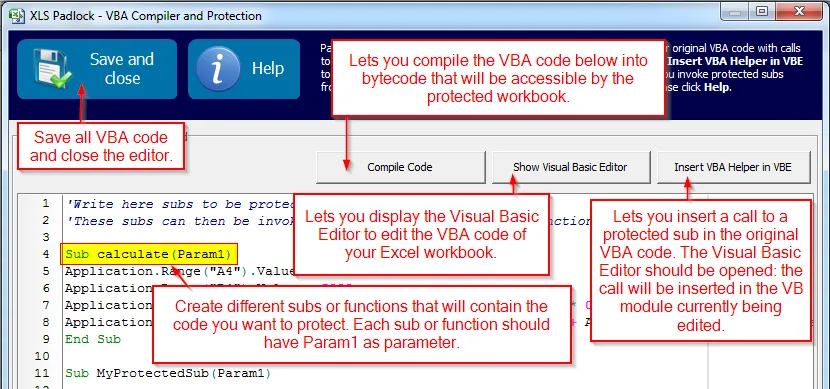
The XLS Padlock VBA editor will open:
-
In the text area, enter the VBA code you want to compile. You can group your code into
subsandfunctions. To simplify this process, you can open the Visual Basic Editor by clicking “Show Visual Basic Editor” and copy/paste your code.By default, all subs and functions have one parameter named
Param1. However, you can use more parameters. -
When you are done, click “Compile Code”. The VBA code is instantly compiled into bytecode, which XLS Padlock will store until you compile your application EXE file.
- Click “Save and close” to close the editor.
👉 After compiling your code, you will need to modify your original VBA macros to call the compiled version. Learn how to do so in the Invoking Compiled VBA Code at Runtime guide.