The 2026 activation protocol
Starting with XLS Padlock 2026.0, compiled workbooks use a new activation protocol based on JSON request/response envelopes with mandatory Ed25519 signature verification. The FS Subscription kit auto-detects the protocol on each request, so workbooks packed in the legacy “Compatibility mode for pre-2026 activation kits” keep working unchanged (plain-text responses, no signature).
This protocol applies to activation, validation and deactivation alike.
One Ed25519 keypair per product
Section titled “One Ed25519 keypair per product”Because this kit serves multiple workbooks (one entry per product in workbooks.json, see Step 4), you manage one Ed25519 keypair per product. The private (secret) key goes into that product’s new xlspadlocksignkey field in workbooks.json; the matching public key is embedded in the compiled workbook by XLS Padlock.
To enable the 2026 protocol for a product:
- In the XLS Padlock Designer, open the Activation Keys / Online Activation page for that workbook.
- Uncheck “Compatibility mode for pre-2026 activation kits”.
- Click “Generate keypair…”. The public key auto-fills in the Designer; copy the displayed private (secret) key into that product’s xlspadlocksignkey field in workbooks.json.
- Re-pack the protected workbook.
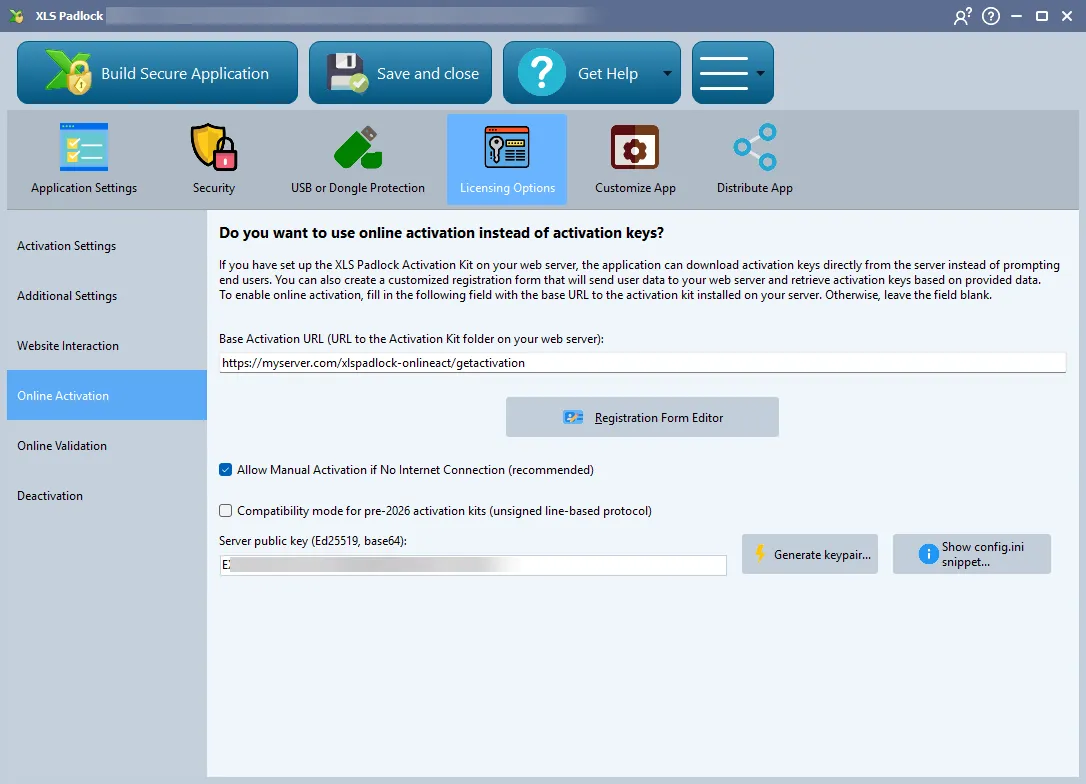
The Server Public Key field on the Online Activation page is read-only: it is filled automatically when you click “Generate keypair…”, so the keypair must be created from the Designer. Copy the displayed private (secret) key into that product’s xlspadlocksignkey field in workbooks.json.
Refusals and server errors
Section titled “Refusals and server errors”The kit shipped with XLS Padlock 2026.3 separates two kinds of failure:
- A refusal, for example a subscription that is no longer active or a blocked customer, is a signed answer with an error status. If you selected Blacklist activation key in XLS Padlock, it blacklists the activation key.
- An internal failure, for example the FastSpring API being unreachable, a missing or replaced key file, or any other server-side error, is answered with HTTP 503 and a plain-text message, never with a refusal. Applications compiled with XLS Padlock 2026.3 or later treat it as “no reliable answer” and never blacklist the key for it. Older kits answered these failures with a refusal.
Refusals to validation and deactivation requests also carry a chal_sha256 field, the SHA-256 of the chal value sent in the request. Applications compiled with XLS Padlock 2026.3 or later ignore a refusal whose fingerprint does not match their own request, so a refusal recorded on the network cannot be replayed to blacklist the keys of other customers. Refusals without this field, from older kits or custom servers, are still honoured.
Requirements
Section titled “Requirements”The 2026 protocol needs the PHP sodium extension (libsodium) on your server - bundled with PHP 7.2 and later, including all PHP 8.x. See Server requirements for the FS Subscription kit. If xlspadlocksignkey is left empty while a workbook sends a 2026 JSON request, the kit reports a misconfiguration error (HTTP 503 with the kit shipped with XLS Padlock 2026.3).