Step 3: test your installation
Once your web application is configured, we provide a simple PHP script to test if it is properly configured and detects your WordPress installation.
Open your Web browser and navigate to the URL above + testsetup.php
With the example in step 1, we would go to:
https://www.mywebsite.com/wordpress/activation/testsetup.php
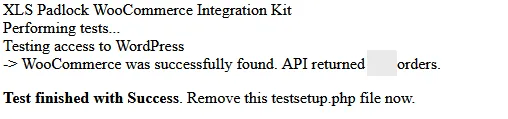
This PHP script will try to load the WordPress API, count the number of existing orders (just for testing, we don’t use this number at all), check whether the local encryption keyfile exists…
After the execution of the PHP script, your web browser should show:
Troubleshooting: if you encounter a 404 error page, it’s likely that the server rewrite rules are not enabled or are incorrectly configured. Be aware that the provided .htaccess file is intended for Apache servers, and web.config is for Windows servers. If you are using NGINX or another type of server, you will need to convert the rewrite rules into the appropriate format for your server, as explained in the Server Requirements.