Step 6: let FastSpring generate activation tokens
When customers purchase your subscription from FastSpring, they need to be sent an activation code or token.
We will then configure FastSpring to automatically generate this activation code and send it to the customer by email. This token lets him activate the workbook.
Generate the activation code
Section titled “Generate the activation code”In FastSpring dashboard, select Catalog / Subscriptions then edit the subscription associated to the workbook.
In Fulfillment, click Add New Fulfillment.
Choose Generate a License then Script (PHP), click Next:
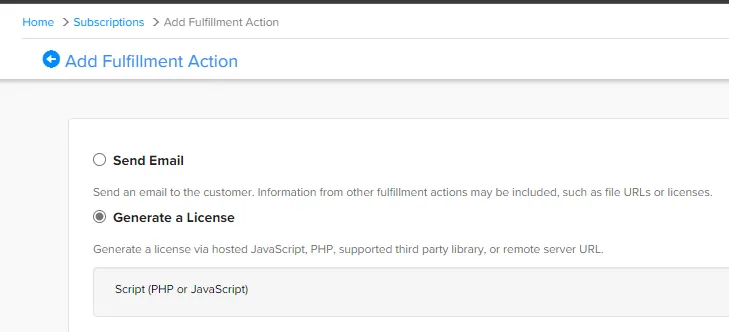
Configure all fields like on this screenshot and click Create.
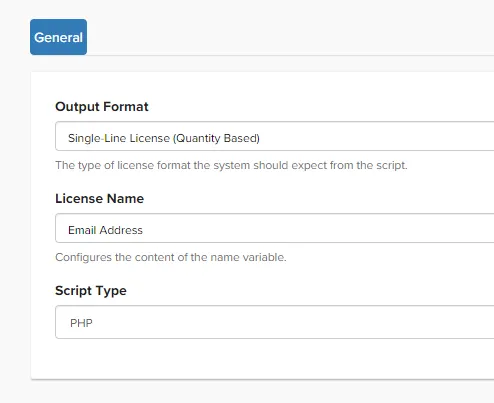
In PHP Script Source, copy and paste the following PHP code:
<?php
$ascii = $subscription;$hex = '';  for ($i = 0; $i < strlen($ascii); $i++) {    $byte = strtoupper(dechex(ord($ascii[$i])));    $byte = str_repeat('0', 2 - strlen($byte)).$byte;    $hex.=$byte;}$res = wordwrap($hex, 4, '-', true);print $res;
?>
Click Test to verify the code and Save to save your changes.
The activation token is based on the subscription ID internally used by FastSpring.
Send the email with activation code
Section titled “Send the email with activation code”After purchase, FasSpring sends a receipt message that automatically includes relevant fulfillment details, including the activation code generated as described above.
There is no additional step to configure.