How to Create an Installer for Your Application
Packaging your compiled workbook into a professional installer (or setup program) is an excellent way to distribute your application. Installers offer a familiar user experience and can handle tasks like installing multiple files (such as a readme), displaying a license agreement, creating shortcuts, and providing an uninstaller for clean removal.
XLS Padlock integrates with our software, Paquet Builder, to generate custom and compact installers. Paquet Builder must be installed on your computer to use this feature.
Paquet Builder is a powerful tool that combines a 7-Zip self-extracting archive maker with a setup routine generator. It allows you to create flexible and compact installers for professional software distribution, package documents and program files, build multilingual installation packages, generate updates, and wrap multiple files into a single .exe for easy distribution online.
To create an installer:
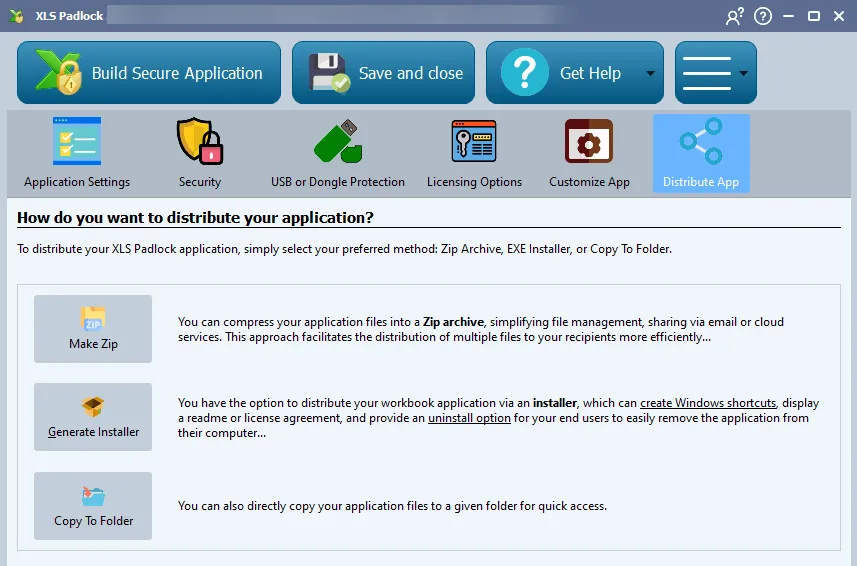
- Click Generate Installer in the “Distribute” tab of XLS Padlock. This will open the “Make Setup for your compiled workbook” window.
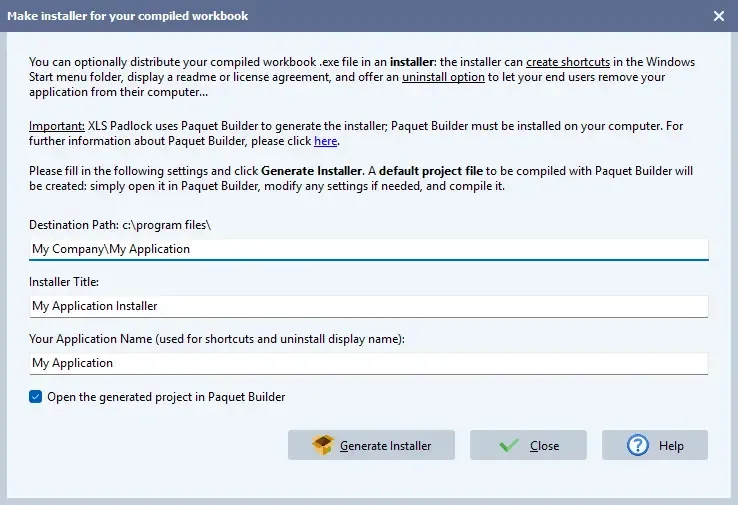
- Fill in the “Destination path” (default installation folder), “Setup title” (window title for the installer), and “Your Application Name” (for shortcuts, uninstaller, etc.).
- Press Generate Installer to create the Paquet Builder project. XLS Padlock will then launch Paquet Builder, allowing you to further customize the project and build the final installer.
👉 See the full tutorial on how to make an installer for your Excel workbook.