Application Packaging Options
The Application Packaging option determines how your secure workbook is compiled, offering two distinct formats.
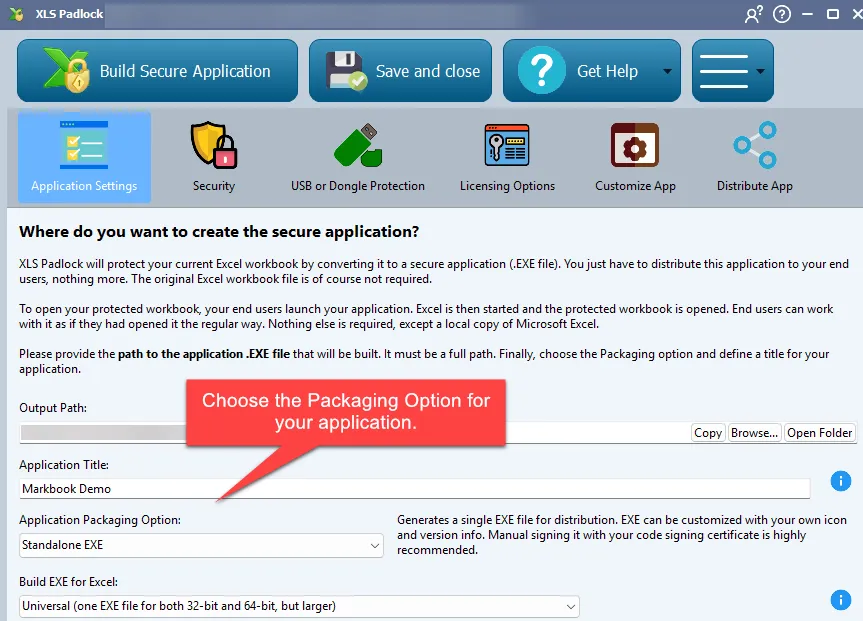
Standalone EXE
Section titled “Standalone EXE”This option compiles your Excel workbook into a single, standalone executable (.exe) file. You can distribute this single file to your users, and they will not need the original Excel workbook.
EXE + XPLAPP Application Bundle
Section titled “EXE + XPLAPP Application Bundle”This option creates an EXE file along with a .bin64 companion file and a .xplapp data file. The main EXE file is pre-signed by our company, which helps it be more trusted by Windows SmartScreen and antivirus solutions.
- This distribution method requires that the EXE,
.bin64, and.xplappfiles are all kept in the same folder. - For convenience, XLS Padlock can bundle these files into a single Zip archive or an installer.
- Using this method substantially reduces the chances of encountering “Unknown Application” alerts and antivirus false positives.
- The
.bin64companion file ensures compatibility with 64-bit versions of Excel. - The bundle’s EXE file is the XLS Padlock Launcher. If it is started without its
.xplappfile, it shows a welcome screen, in the Windows display language, that lets the end user choose the protected application to open.