Localization and Translation
XLS Padlock provides localization support for your protected workbooks, allowing you to display all interface text (dialog captions, messages, prompts, runtime warnings and the Web Update wizard) in the language of your choice.
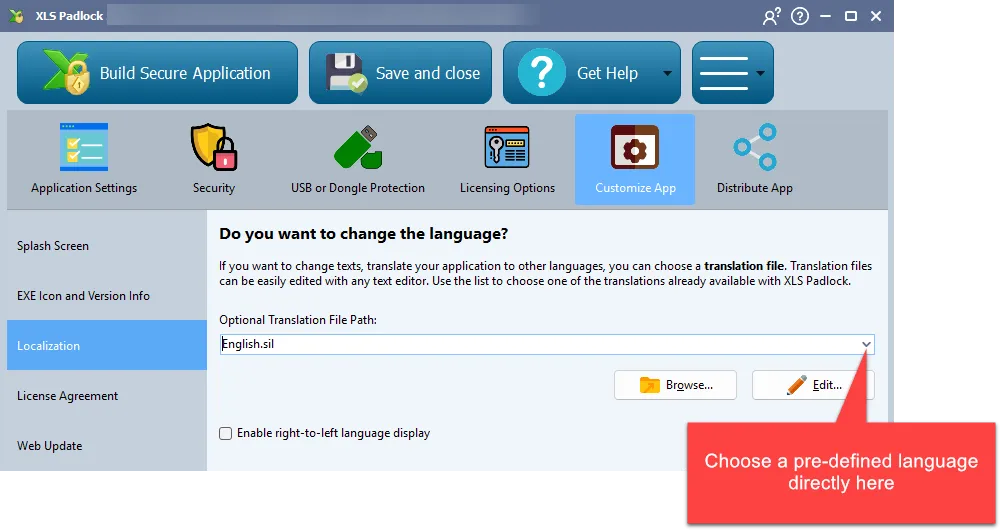
You can configure localization for your protected workbook app here:
Translation file format
Section titled “Translation file format”Since XLS Padlock 2026, translation files use the standard GNU gettext format with the .po extension (and its compiled binary counterpart .mo). This is the same format used by Linux distributions, Python, PHP, WordPress and countless other applications, which means you can edit translations with any of the dozens of mature gettext tools available, including the free cross-platform Poedit editor.
The compiled application embeds a single .mo resource at build time, loaded entirely from memory at runtime. No temporary files are extracted to disk.
XLS Padlock ships with pre-translated .po files for 10 languages, available in the locale\ subfolder of your XLS Padlock installation directory:
| File | Language |
|---|---|
en.po | English |
fr.po | French |
es.po | Spanish |
pt.po | Portuguese (Brazil) |
nl.po | Dutch |
de.po | German |
ar.po | Arabic (right-to-left layout supported) |
it.po | Italian |
zh_CN.po | Simplified Chinese |
zh_TW.po | Traditional Chinese |
Request a new language
Section titled “Request a new language”If you need a language that is not on the list, please contact us. You can also create your own .po file from any of the above as a starting point. See Editing translation files below.
How to define a language for your protected workbook
Section titled “How to define a language for your protected workbook”- On the Localization page, click Browse next to the Translation file field. The dialog opens by default on the
locale\folder of your XLS Padlock installation, where the 10 ready-made.pofiles live. Pick the language you want, or navigate to a custom.pofile of your own. - You can also paste the full path manually into the Translation file field, or leave it empty to use the default English translation embedded in XLS Padlock.
Editing translation files
Section titled “Editing translation files”.po files are plain UTF-8 text files. You can edit them in two ways:
- With Poedit (poedit.net, free, cross-platform), the recommended choice. It shows source and translated strings side-by-side, flags fuzzy and untranslated entries, validates syntax on save and produces a clean UTF-8 output.
- With any text editor (Notepad++, VS Code, …). Save as UTF-8 without BOM and keep one
msgid/msgstrpair per block. Lines starting with#are comments and are not displayed to the end user.
We recommend you copy one of the pre-made .po files to a new location (next to your workbook for example), modify the copy, and then point XLS Padlock to your new file. Modifying files inside the XLS Padlock installation folder generally requires administrative rights and may be overwritten by a future update.
Migrating from legacy .sil translation files
Section titled “Migrating from legacy .sil translation files”If you customised the user interface of your protected workbook under XLS Padlock 2025.3 or earlier, your translation was stored as a .sil file (the legacy text-based translation format used by previous releases). XLS Padlock 2026 no longer reads .sil files at compile time. The format has been replaced by .po.
To avoid retyping anything, the XLS Padlock distribution includes a small SIL → PO migration helper under tools\sil_to_po\ in the source tree:
python tools/sil_to_po/sil2po_customer.py your_translation.sil --lang fr --statsThis produces customer_fr.po in the current folder, automatically merged against the current canonical .po so that:
- the column matching your target language is copied across,
- strings added since your
.silwas authored appear with an emptymsgstr(ready to fill in Poedit), - strings whose English source drifted slightly across versions are flagged
#, fuzzyfor your review, - strings that no longer exist in XLS Padlock are appended at the end as
#~obsolete entries (or dropped entirely with--drop-orphans).
To migrate several languages in one run, comma-separate them:
python tools/sil_to_po/sil2po_customer.py your_translation.sil --lang fr,es,de --statsThe resulting .po files are immediately usable from the Translation file picker in the XLS Padlock Designer. The helper script and its companion README.md (full option reference, matching algorithm, worked examples) ship in the tools\sil_to_po\ subfolder of the XLS Padlock installation directory. Open README.md in any text editor to read the complete documentation locally.
Python 3.8 or later is required to run the helper. No external Python dependencies: the script is self-contained.