
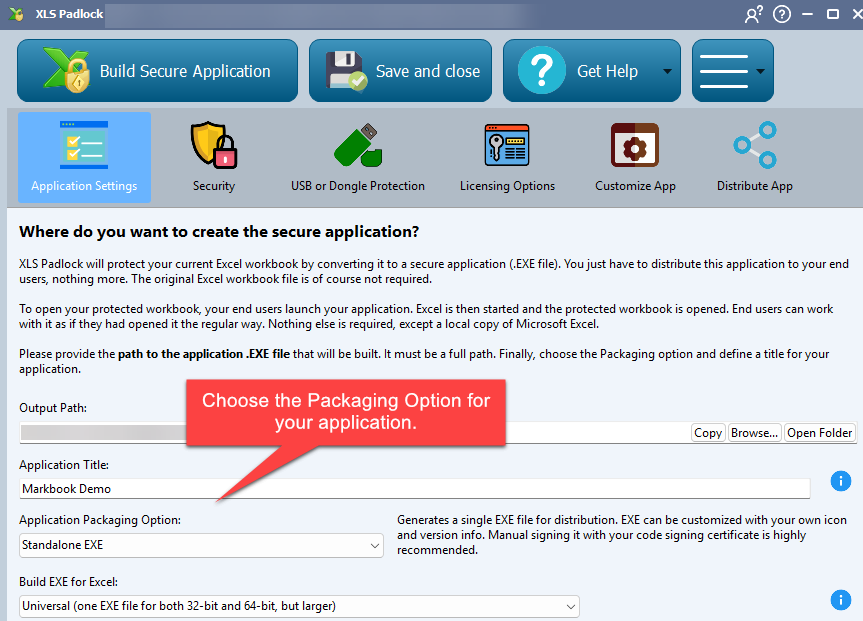
The Application Packaging option determines how your secure workbook is compiled, offering two distinct formats.
Recommendation
We recommend the Standalone EXE option if you have a digital signing certificate. While not mandatory, signing your EXE is the best way to avoid “Unknown App” warnings from Windows SmartScreen and to reduce false positives from antivirus software.
Standalone EXE #
This option compiles your Excel workbook into a single, standalone executable (.exe) file. You can distribute this single file to your users, and they will not need the original Excel workbook.
EXE + XPLAPP Application Bundle #
This option creates an EXE file along with a .bin64 companion file and a .xplapp data file. The main EXE file is pre-signed by our company, which helps it be more trusted by Windows SmartScreen and antivirus solutions.
- This distribution method requires that the EXE,
.bin64, and.xplappfiles are all kept in the same folder. - For convenience, XLS Padlock can bundle these files into a single Zip archive or an installer.
- Using this method substantially reduces the chances of encountering “Unknown Application” alerts and antivirus false positives.
- The
.bin64companion file ensures compatibility with 64-bit versions of Excel.


